Baofeng uv5r channel guide
📻 Radio Channel Helper – Baofeng UV-5R
THIS PROGRAM HELPS LOCATE HAM REPEATERS
📡 Ham Radio Repeater Finder
Filter by System:
📋 Repeater List
chirp programming example
How to Unlock / Factory Reset Baofeng UV5R
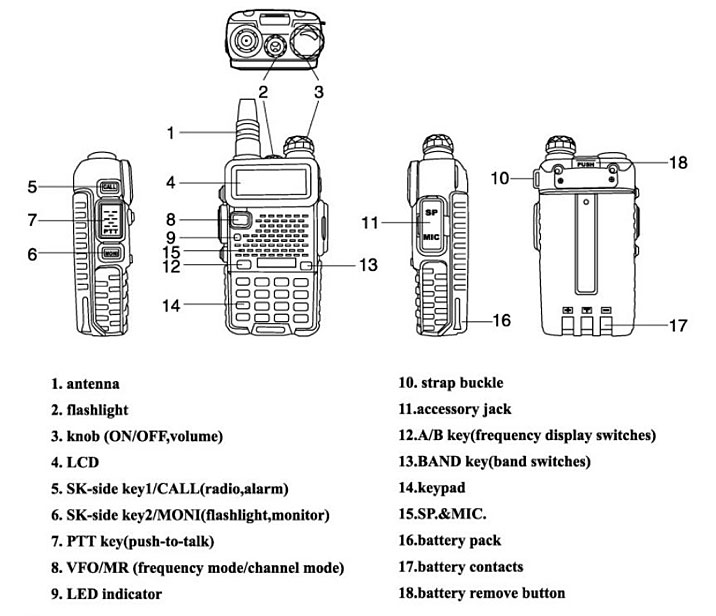
To unlock the Baofeng UV-5R, you need to reset it to factory defaults. Turn the radio off, then press and hold the PTT (Push-To-Talk), VFO/MR, and MON (Monitor) buttons simultaneously while powering the radio back on. You should see “FACTORY” briefly displayed on the screen, indicating the radio is unlocked and reset.
📻 Baofeng UV-5R Channel Guide
www.braycreekforestry.com/radio

- Group 1–22: FRS/GMRS Standard (Consumer Radios)
Match common radios like Motorola/Midland. Use for basic radio-to-radio comms. Sub-channels (privacy codes) do not work. - Group 22-30: GMRS Repeaters
Other People Can Hear - Group 29–36: Reserved/Unused
Available for custom use or local programming. - Group 37–40: Rugged Radios (Off-road)
Matches Rugged Radio channels 1–4. Use for off-road or racing communication. - Group 41–46: MURS / Custom Use
Commonly used for fireline, team channels, or local tactical coordination. - Group 47–56: NOAA Weather Radio
Receive-only weather stations. Use to monitor 24/7 weather and alerts. - Group 57–79: Ham Radio Repeaters (Arizona)
Ham license required to transmit. Statewide duplex repeater channels. OK to listen. - Group 80–102: GMRS Repeaters
GMRS license required to transmit. Duplex repeater channels for longer-range use. - Group 103–109: Public Safety Scanner (Fire/EMS/Police)
Listen-only. Covers Rim Country area agencies. Do not transmit. - Group 110–113: Reserved
Available for programming or future use. - Group 114–121: Repeater Use (Cross-band or Cable)
Used to pair two radios as a simple repeater using VOX or a cable. - Group 122–127: Private Simplex (VHF)
Radio-to-radio operation. Channel 0 is your default team VHF private channel.